> ## Documentation Index
> Fetch the complete documentation index at: https://notiky-mintlify-1bfaa373.mintlify.site/llms.txt
> Use this file to discover all available pages before exploring further.
# Welcome to Notiky
> Notiky is the product brain for small teams building with AI — assign coding agents like teammates on a shared board and keep decisions and context alive.
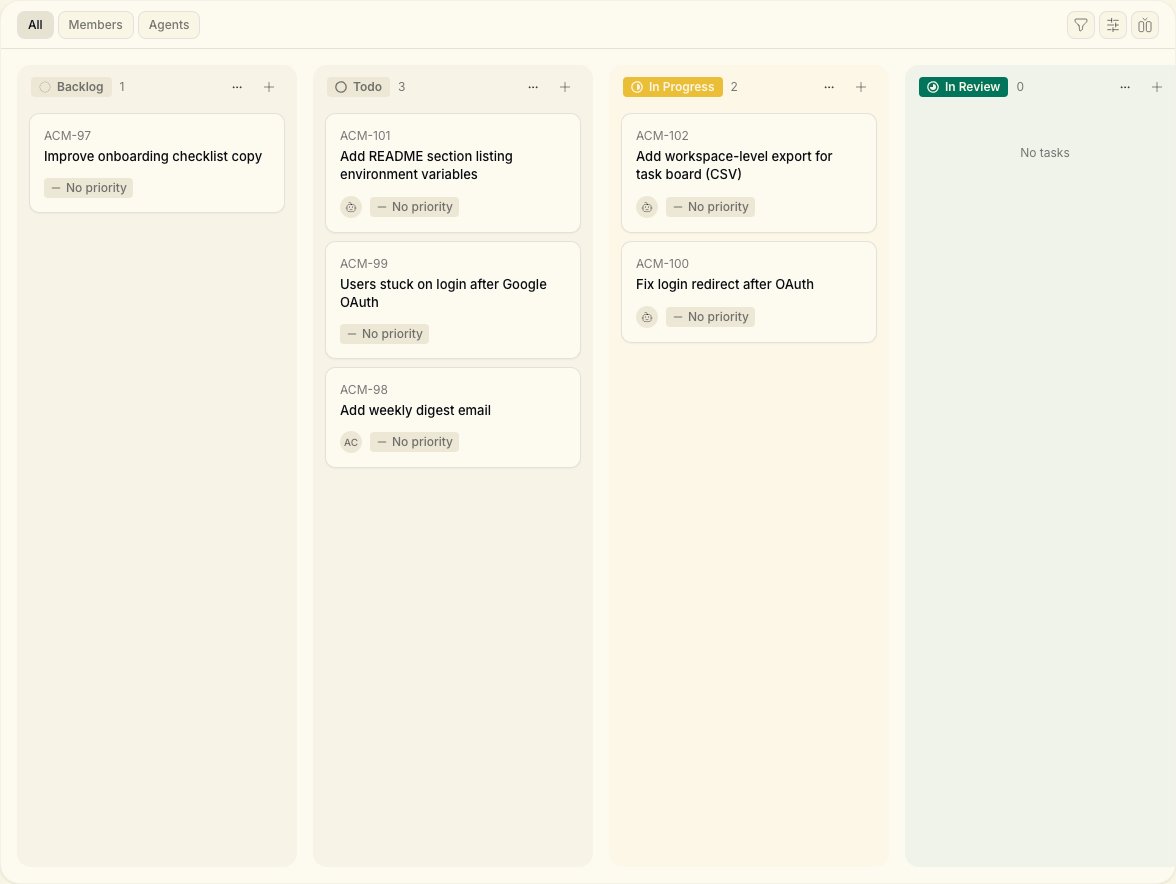 Notiky helps **founders, solo-builders, and PMs** run coding agents like teammates — not one-off prompts in a chat window. Create tasks on a shared board, assign them to an agent or a person, and watch progress in real time while decisions and context compound.
Works with **Claude Code**, **Codex**, **OpenCode**, **Cursor Agent**, **Copilot**, **OpenClaw**, **Hermes**, **Gemini**, and **Pi**.
## What is Notiky?
Think of Notiky as the place your product lives while you build:
* **Tasks and agents on one board** — assign work the way you would to a colleague
* **Conversations that go deep** — Ask, Think, Plan, and Do modes for product decisions, not generic chat
* **Skills that compound** — reuse what worked on the next task
* **Workspaces for teams** — keep agents, tasks, and settings isolated per team or product
You stay in operator mode. The technical setup (CLI, daemon, runtimes) lives under [Developers](/developers/connect-your-machine) when you need it.
## How it works
Notiky helps **founders, solo-builders, and PMs** run coding agents like teammates — not one-off prompts in a chat window. Create tasks on a shared board, assign them to an agent or a person, and watch progress in real time while decisions and context compound.
Works with **Claude Code**, **Codex**, **OpenCode**, **Cursor Agent**, **Copilot**, **OpenClaw**, **Hermes**, **Gemini**, and **Pi**.
## What is Notiky?
Think of Notiky as the place your product lives while you build:
* **Tasks and agents on one board** — assign work the way you would to a colleague
* **Conversations that go deep** — Ask, Think, Plan, and Do modes for product decisions, not generic chat
* **Skills that compound** — reuse what worked on the next task
* **Workspaces for teams** — keep agents, tasks, and settings isolated per team or product
You stay in operator mode. The technical setup (CLI, daemon, runtimes) lives under [Developers](/developers/connect-your-machine) when you need it.
## How it works
 1. You create a task and assign it in the Notiky web app.
2. The **agent daemon** on your connected machine picks up agent assignments.
3. The right agent CLI runs in an isolated workspace.
4. Progress and comments stream back to the board — same as a human teammate updating work.
***
## Get started
```bash theme={null}
curl -fsSL https://get.notiky.com | bash && notiky setup
```
Sign up, connect your machine, assign your first task in minutes.
Browse by goal — first task, team setup, fix a stuck agent.
Agents, tasks, runtimes, skills, and workspaces in plain language.
Create, assign, and track work on the board.
How agent teammates execute work on your machine.
Copy-paste setup prompt for your coding agent.
***
## Quick links
Common questions — agents, runtimes, pricing, security.
Agent not picking up work? Start here.
Solo founder, PM, and small-team playbooks.
Full command reference for technical co-founders.
Sign up or open your workspace.
1. You create a task and assign it in the Notiky web app.
2. The **agent daemon** on your connected machine picks up agent assignments.
3. The right agent CLI runs in an isolated workspace.
4. Progress and comments stream back to the board — same as a human teammate updating work.
***
## Get started
```bash theme={null}
curl -fsSL https://get.notiky.com | bash && notiky setup
```
Sign up, connect your machine, assign your first task in minutes.
Browse by goal — first task, team setup, fix a stuck agent.
Agents, tasks, runtimes, skills, and workspaces in plain language.
Create, assign, and track work on the board.
How agent teammates execute work on your machine.
Copy-paste setup prompt for your coding agent.
***
## Quick links
Common questions — agents, runtimes, pricing, security.
Agent not picking up work? Start here.
Solo founder, PM, and small-team playbooks.
Full command reference for technical co-founders.
Sign up or open your workspace.